You use video encode and decode when you watch movies online or stream games. Video encode changes video from its original form to a smaller digital version. While decode lets your device turn the digital version back into a video you can watch. These steps work in reverse. They need codecs and hardware or software to work well.
Key Takeaways
Video encoding makes video files smaller. This helps videos stream faster. The quality stays the same.
AI-driven encoding tools use less bandwidth. They can lower it by up to 30%. This makes videos clearer and faster.
Picking modern codecs like AV1 or HEVC is smart. These codecs give better video quality. They also use less data when streaming.
Hardware decoding helps videos play better. It also saves battery life. This is important for high-resolution videos.
Adaptive bitrate streaming changes video quality as you watch. It does this in real-time. This gives smoother viewing. It works even if your internet speed changes.
Video Encode and Decode: The Basics
What Is Video Encoding
You use video encoding when you watch movies online or share clips. Video encoding changes raw video into a smaller digital format. This makes it easier to send videos over the internet. Streaming is possible because of video encoding. Without it, videos would need lots of storage and bandwidth. Even short videos would be hard to watch.
Video encoding compresses the original video. It removes parts you cannot see or hear. The goal is to keep the video looking good. The file gets much smaller. Imagine packing a suitcase. You want to fit everything in, but you do not want your clothes to get wrinkled.
Here are the main steps in video encoding:
Preprocessing: The system breaks the video into small macroblocks.
Transform: It changes video data from space to frequency. This helps remove extra information.
Quantization: The system lowers video detail in ways you will not notice.
Entropy Encoding: It uses math tricks like Huffman coding to shrink the video more.
Bitstream Formatting: The system puts all compressed data into a stream for sending or storing.
Many streaming platforms use special algorithms for video encoding. Some common ones are:
H.264/AVC: This is the most popular. It gives good quality at lower bitrates.
H.265/HEVC: This is newer. It makes files even smaller and keeps video sharp.
VP9: This is free to use and works on many devices. It competes with H.265.
Tip: Pick a streaming service that uses modern video encoding. You will get better quality and faster loading.
What Is Video Decoding
Video decoding lets your device turn compressed digital video back into something you can watch. When you press play, your phone or TV rebuilds the video frame by frame. Video decoding is just as important as video encoding. If your device cannot decode fast, you will see pauses or glitches.
There are two main types of video decoding: hardware and software. Hardware decoding uses special chips inside your device. Software decoding uses the main processor. Here is a table to show the differences:
Aspect | Hardware Decoding | Software Decoding |
|---|---|---|
Performance and Efficiency | Works better than software decoding. It is made for video tasks. Playback is smoother and CPU load is lower. | Needs a strong CPU. It can struggle with high-resolution content. |
Compatibility and Adaptability | Supports many codecs. It is less adaptable to new standards. | More flexible. It can adapt to new codecs with updates. |
System Requirements | Needs special hardware parts like GPUs or chips. | Can run on more devices without special hardware. |
Power Consumption | Uses less power. This is good for portable devices. | Uses more power. It can drain battery faster. |
How They Work Together
Video encoding and video decoding work together as a team. You need both for smooth streaming. When you watch a live event, the service uses video encoding to compress the video. Your device uses video decoding to turn compressed data into moving images.
How these two work together affects video speed and clarity. New methods like Overlapped Streaming Position Encoding and Group-Decoupled Position Encoding help both sides work at once. This means less delay and a better experience, especially for live streams.
You see good teamwork every time you watch a video online. Video encoding makes files small and quick to send. Video decoding lets you see every detail without waiting. As streaming grows, new standards and codecs keep improving how encoding and decoding work together. This gives you better quality and less lag on any device.
Compression and Codecs
Role of Video Compression
Video compression helps you watch videos online without waiting long. It makes video files smaller, so they load fast and use less data. When you stream, video compression takes out extra parts you do not need to see. This lets your videos start quickly and play smoothly on any device.
Video compression makes videos smaller for smooth streaming.
It removes extra data and makes frames simpler.
This helps videos start faster and work on many devices and speeds.
Streaming uses lossy video compression a lot. This type throws away some video data, usually things you do not notice. Sometimes, you might see a little blur or blocky spots if there is too much compression. Most of the time, you get a good mix of size and quality.
Popular Codecs (H.264, H.265, AV1, VP9)
You use video codecs every time you stream a video. Video codecs are tools that shrink and open up video files. The best codecs give you clear video and use less data. Here are some of the most used video codecs:
H.264: This codec gives okay compression and good quality. Many streaming sites use it.
H.265 (HEVC): This codec shrinks files more and keeps quality high. You find it in newer devices.
AV1: This codec is great for streaming. It gives the smallest files and best quality. You do not pay to use it.
VP9: This codec is free and works well for HD video.
Codec | Quality at 4K | Bandwidth Requirement | Licensing Fees | |
|---|---|---|---|---|
H.264 | Moderate | Acceptable | High | Yes |
HEVC | High | Better | Lower than H.264 | Yes |
AV1 | Highest | Best | Lowest | No |
Codec Efficiency and Quality
You want good codecs for streaming because they keep videos sharp and small. Video codecs use smart ways to make files tiny but still look good. New codecs like H.264 and H.265 use cool tricks to keep your video clear, even when files are small.
Note: Lossy codecs trade quality for smaller size. More compression can make videos look worse, but it saves data and money.
You need to find the right mix. If you compress too much, videos can look bad. If you compress too little, files are too big. The best codecs help you use your internet and device in the best way.
Hardware and Software Decoding
Hardware Decoders in Devices
Many devices like phones, tablets, and smart TVs have hardware decoders. These chips do video jobs fast and use less energy. When you stream a movie, the hardware decoder works with the codec. This helps the video play smoothly. Your battery lasts longer and your device works better, even with 4K video. Hardware decoding works with popular codecs like H.264 and HEVC. The table below shows how hardware and software decoding are different:
Aspect | Hardware Decoding | Software Decoding |
|---|---|---|
System Requirements | Needs special hardware like GPUs or chips | Works on more devices without special hardware |
Power Consumption | Uses less power, good for portable devices | Uses more power, can drain battery faster |
Performance on High-res Content | Great for high-resolution video like 4K | Has trouble with high-res video on weak CPUs |
Flexibility | Not as flexible, needs hardware upgrades | More flexible, can update for new codecs |
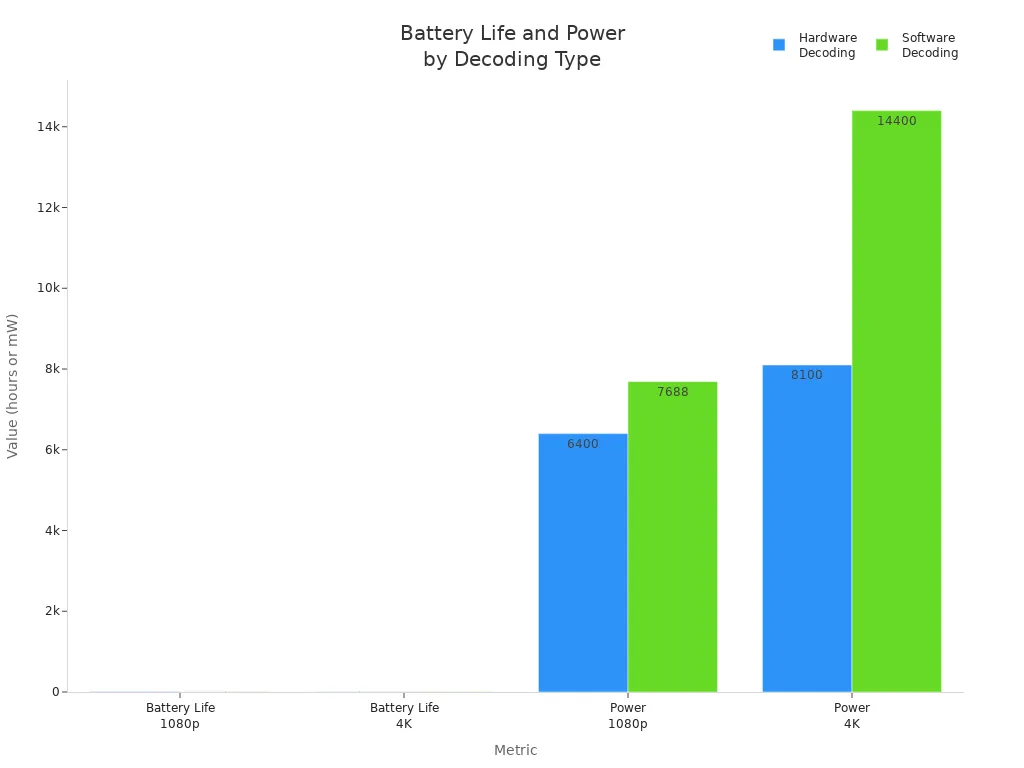
You can see how battery life and power use change in the chart below. Hardware decoding lets you watch videos longer and saves energy.
Software Decoding Explained
Software decoding uses your device’s main processor to play videos. You do not need special hardware, so it works on many devices. Software decoding can use new codecs if you update the software. It is more flexible, but high-resolution video may play slower. Software decoding uses more energy, so your battery can run out faster. If you play videos with advanced codecs like AV1 or VVC, software decoding can use up to 50% more energy. This can also cause problems when playing videos.
Software decoding for new codecs like AV1 and VVC uses more energy.
Battery life can drop by 25% to 50% when you play these videos.
Advanced codecs save space, but you might see more problems and higher energy use.
Compatibility and Performance
You should think about compatibility and performance when picking hardware or software decoding. Hardware decoders work well with common codecs, but you may need new hardware for new codecs. Software decoding can use new codecs with updates, but it can slow down your device and use more power. Hardware decoding gives you less delay because it uses special parts. Software decoding can cause more delay, especially with big videos or old devices.
Hardware decoding gives you less delay when streaming video.
Software decoding can cause more delay and slower video.
Hardware decoders cut down on waiting, but software decoders depend on the CPU.
You get the best streaming when your device uses the right codec and decoding method for your video.
Importance in Streaming
Impact on Quality and Bandwidth
You want your video to look good and load fast. How you encode and decode video changes how much data you need. It also affects how clear the video is. If you use a modern codec, you can watch sharp video with less data. This means you use less internet and see fewer pauses.
Here is a table that shows how different codecs and methods help you save data:
Codec | Bandwidth Reduction | Notes |
|---|---|---|
AV1 | 30-50% | Developed by Alliance for Open Media |
H.266/VVC | 50% | Better compression than H.265 |
AI-Based Encoding | Up to 20% savings | Used by Netflix’s Per-Title Encoding |
Adaptive Bitrate | Up to 40% savings | Adjusts quality based on network conditions |
You can see that picking the right codec can cut your data use in half. Adaptive bitrate streaming helps too. It changes video quality to match your internet speed. This keeps your video playing without stopping, even if your connection gets slow.
The settings you pick for encoding are important. Look at this table to see how different settings change video quality:
Encoding Setting | Impact on Quality |
|---|---|
Bitrate | Higher bitrate usually makes video look better but makes files bigger. |
Resolution | Higher resolution shows more detail but needs more data. |
Codec Choice | Good codecs like H.264 and HEVC keep quality high with less data. |
If you want great video, you need to balance bitrate, resolution, and codec. Streaming services use smart tools to pick the best settings for each video. They use AI to change encoding for every show or movie. This gives you the best mix of quality and speed.
Advanced codecs like H.265 (HEVC) or AV1 shrink files a lot but keep the video looking good. This is important for high-definition streaming.
Latency and User Experience
Latency is the time it takes for something to happen and for you to see it. In live streaming, you want to see things right away. Encoding and decoding can add to this wait time. The codec you use, your settings, and your device speed all matter.
Encoding can slow things down if it uses a hard codec or high settings. When the video gets to your device, the decoder must work fast. If either step is slow, you will notice a lag, especially during live events.
Keeping latency low is very important for live streams. You want to see sports, news, or games as they happen. Streaming platforms use fast codecs and special settings to keep delays short. They also use adaptive bitrate streaming to change quality quickly if your internet changes. This helps you get smooth and real-time video.
Streaming services use many ways to keep latency low and make your experience better:
Adaptive bitrate streaming (ABR) changes video quality based on your internet speed, so you use your data well.
Codec testing checks different codecs to see which one works best.
Real-time latency monitoring watches for delays to keep streaming smooth.
Advanced analytics collect data about how people watch videos to make streaming better.
Common Challenges and Solutions
You might have problems when you stream video. Some common issues are buffering, sudden drops in video quality, high latency, and videos not playing on some devices. These problems often come from how the video is encoded, the codec used, or how your device decodes the video.
Here is a table that lists the most common problems:
Complaint Type | Description |
|---|---|
Buffering & frozen streams | Happens when the player cannot get video fast enough, so the video stops and starts. |
Sudden drops in video quality | Happens when the player cannot keep up, so the video goes from HD to lower quality. |
High latency in live streams | Means there is a delay, so you see things later than they happen. |
Playback fails on certain devices | Happens when the codec or format does not work on your device or browser. |
Streaming platforms use new technology to fix these problems. They use codecs like AV1, which gives you 30% better compression than H.265 and keeps video clear at lower bitrates. They also use protocols like MPEG-DASH and HLS. These let the service change video quality up or down based on your device and internet. Adaptive bitrate streaming makes many versions of each video, so you always get the best one for your situation.
Technology/Protocol | Description |
|---|---|
AV1 | A new codec that gives 30% better compression than H.265 and keeps video clear at lower bitrates. |
MPEG-DASH and HLS | Streaming protocols that let the service change video quality based on your internet and device. |
Adaptive Bitrate Streaming | Changes video quality in real time to stop buffering and gives you a smooth video by making many versions. |
Streaming services also check and improve encoding and decoding for lots of viewers. They set up adaptive bitrate streaming, test different codecs, watch for delays, and use data to make streaming better. This helps you get good, reliable video every time you stream.
Adaptive bitrate streaming is a tool that changes video quality based on your internet and device. This makes sure you get the best video without stops, and it balances cost and quality.
You can enjoy live streaming and clear video on many devices because of these smart fixes. The right codec, good encoding settings, and fast decoding all work together to give you a great streaming experience.
Future Trends
Emerging Codecs and Technologies
You will see new codecs changing how you stream video. These codecs make video files smaller and keep the quality high. Here are some of the latest codecs you should know about:
VVC (Versatile Video Coding) gives you better compression. You get high-quality video at lower bit rates. This codec works well for 4K and even 8K video.
AV1 is an open-source codec. It offers 30% more efficiency than H.265. Big companies support AV1, so you will find it on many new devices.
EVC (Essential Video Coding) helps you stream with less power. This codec keeps things simple and fast.
LCEVC (Low Complexity Enhancement Video Coding) is great for devices with limited processing power. You get good video without needing a strong chip.
AI and machine learning also help codecs work smarter. These technologies change how codecs compress video. They look at each scene and pick the best way to shrink the file. You get efficient streaming and high quality at the same time.
Tip: If you want the best streaming experience, check if your device supports the newest codec. This will help you watch sharp video with less data.
Improvements in Streaming Efficiency
Streaming platforms use new codecs and smart technology to make streaming better for you. You save data and get smooth video. Here are some ways streaming gets more efficient:
H.265 gives you the same quality as H.264 but uses half the bandwidth. This codec helps you stream on slow internet.
VP9 matches H.265 for compression. It is royalty-free, so streaming services can use it without extra cost.
AV1 can save up to 40% more bandwidth than H.265. You need a newer smart TV to use this codec.
New encoding workflows let you save 25-35% in bitrate. You still get great video quality.
AI helps streaming platforms process video faster. Content-aware encoding lets codecs focus on important parts of the video. Neural networks help codecs compress video and lower latency. These changes mean you get better video and less waiting.
Strategy | Description |
|---|---|
Platforms use AI to make codecs more efficient and adapt to new standards. | |
Codec-agnostic solutions | Services optimize video without sticking to one codec, making it easy to switch in the future. |
Preprocessing with AI | Companies use AI before encoding to save bandwidth and keep their systems ready for new codecs. |
Streaming uses 65% of global internet traffic. When you use a modern codec, you help lower costs and make streaming more reliable for everyone.
You use video encode and decode when you stream online. These steps shrink video files so they load faster. Your device can play videos without problems.
Video encoding makes video smaller for streaming.
Video decoding helps you watch videos without stops.
Encoding gets video ready for the internet.
Decoding keeps your video clear and steady.
Decoding Type | Compression Efficiency | Energy Consumption | Battery Impact | |
|---|---|---|---|---|
H.264 | Hardware | Basic | Uses little energy | Uses more battery |
HEVC | Hardware | Used almost everywhere | Uses some energy | Uses some battery |
AV1 | Software | 33% better than HEVC | Uses lots of energy | Uses less battery |
VVC | Software | 14% better than AV1 | Uses even more energy | Uses very little battery |
Keep learning about new codec technology. This helps you get better video and save data. You can enjoy streaming on any device.
FAQ
Encoding changes raw video into a smaller digital file for streaming. Decoding takes that file and turns it back into video you can watch. You need both steps for smooth streaming.
You might see buffering or blurry video if your internet is slow or the video uses a high bitrate. Streaming services lower quality to keep your video playing without stops.
Most modern devices have hardware decoders for popular codecs like H.264 and HEVC. If your device is older, you may notice slower playback or more battery use.
Tip: Choose services that use AV1, HEVC, or VP9. These codecs give you better quality and use less data. You get sharper video and fewer pauses.