A powerful video downloader in 2026 stands out by offering essential features that boost functionality and efficiency. Key features include an easy-to-use interface, no registration, unlimited downloads, multiple formats, high-quality output, offline viewing, and secure performance. Top online video downloader tools, like TotalMedia VideoConverter’s downloader, deliver all these advantages.
1. Easy-to-Use Interface

Simple Navigation
A user-friendly interface stands as the foundation of any effective video downloader. In 2026, users expect to access features quickly and without confusion. Simple navigation allows users to locate essential tools, such as the integrated search function, with minimal effort. This design approach reduces the time spent searching for options and increases overall satisfaction.
Effective navigation design enhances user satisfaction by simplifying the process of finding and interacting with features.
Good navigation contributes to a positive user experience, which is crucial for applications like video downloader software.
Intuitive navigation builds user confidence and trust in the product, leading to higher satisfaction levels.
A clear interface also supports the functionality of batch downloads, format selection, and queue management. When users can move through menus and options without obstacles, they are more likely to use advanced features and return to the tool regularly.
User Experience
The overall user experience depends on how easy to use the application feels from the first interaction. Video downloaders must cater to both technical and non-technical users. A streamlined interface ensures that anyone can start downloading content without a steep learning curve.
Tip: Look for an online video downloader that provides clear labels, logical menu placement, and instant feedback on actions. These elements help users avoid mistakes and improve their experience.
A well-designed interface not only improves accessibility but also encourages users to explore additional features. This approach increases engagement and maximizes the value of the software. TotalMedia VideoConverter’s downloader exemplifies these principles by offering a straightforward layout and intuitive controls.
2. No Registration Required
Instant Access
A top-tier video downloader in 2026 must offer instant access without requiring users to create an account. This feature removes unnecessary steps and allows users to start their download process immediately. Many users face barriers when asked to register, such as providing accurate information or meeting age restrictions. These procedural hurdles can discourage users from using a service, especially when they want quick results.
The study identified four main issues faced by patients that prevent successful video visits: (1) completion of registration steps, (2) familiarity with accessing and using video conferencing software, (3) attainment of proxy access for parents of a pediatric patient, and (4) resolution of miscellaneous technical queries.
By eliminating registration, online video downloader tools streamline the user experience. Users do not need to remember login credentials or navigate verification emails. This approach supports both casual users and those who require unlimited downloads or batch downloads for large projects.
Privacy Benefits
No registration required means users do not have to share personal information. This feature protects privacy and reduces the risk of data exposure. Many users prefer services that do not collect names, emails, or other identifiers.
No personal information is required for downloading, which enhances user privacy.
These privacy-focused features set leading tools apart in a crowded market. They ensure that users can enjoy a secure and efficient experience every time they use the service.
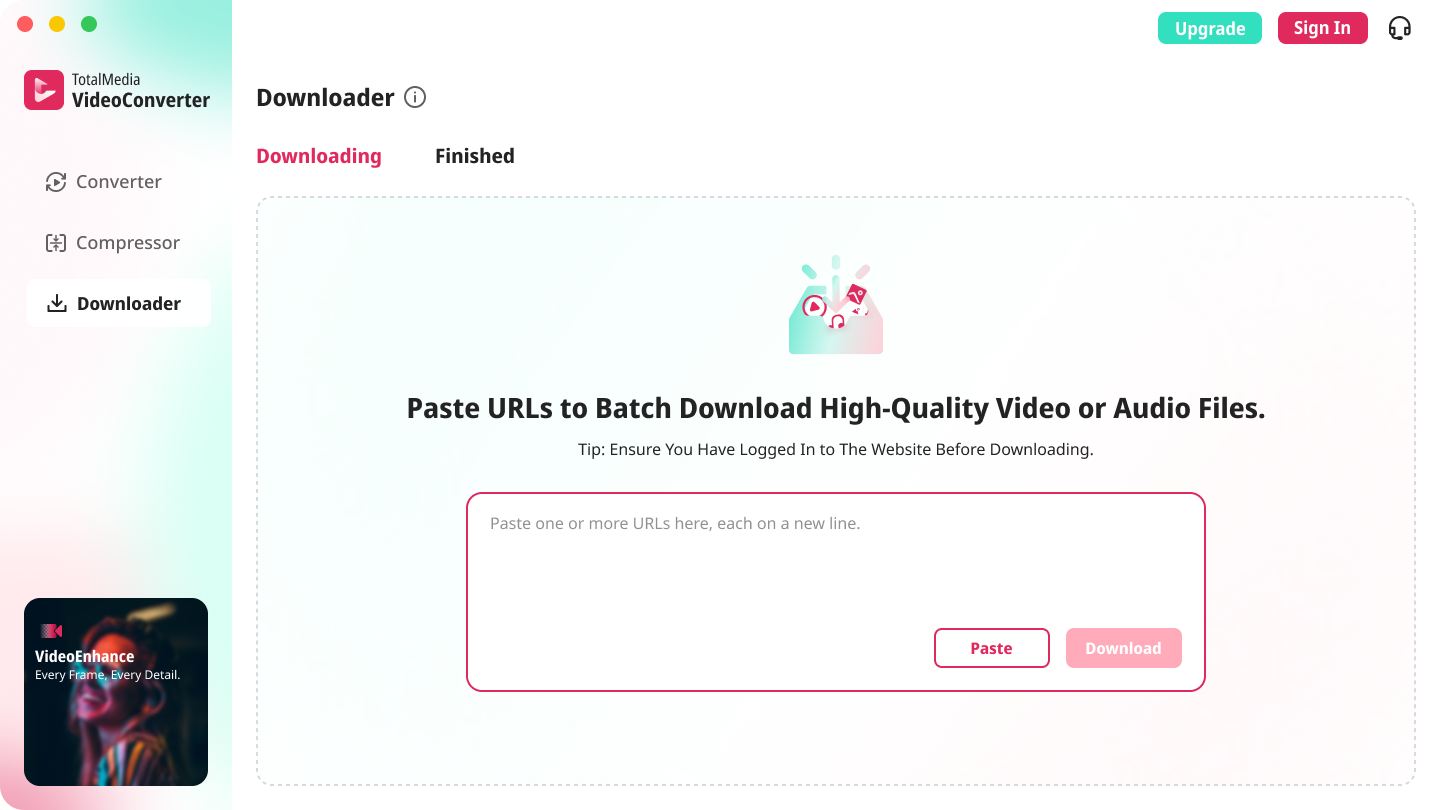
TotalMedia VideoConverter’s downloader stands out by offering no registration, instant batch downloads, and a seamless experience for all users.
3. Unlimited Downloads
Download Without Limits
Unlimited downloads have become a defining feature for any leading video downloader. Users expect the freedom to save as many videos as they need, whether for personal collections, research, or entertainment. This capability is especially valuable for frequent users who rely on batch downloading and advanced features to manage large volumes of content efficiently. A robust interface should make it easy to queue multiple downloads, monitor progress, and access completed files without restrictions.
The popularity of online video downloader platforms often depends on the range of features they offer. The table below highlights some of the most sought-after options that enhance the user experience:
Feature | Description |
|---|---|
Private Browser | Browse and find videos with a built-in browser. |
Private Downloader | Download videos to private folders for enhanced privacy. |
HD Video | Download HD videos for offline playback, including 4K support. |
All Video Downloader | Save videos from various platforms like Instagram, Facebook, and Twitter. |
All Formats Support | Supports multiple formats such as mp3, mp4, and more. |
Download Manager | Manage and delete downloaded videos easily. |
Auto-Detect | Automatically detects video links from the browser for background downloading. |
Why Unlimited Matters
Unlimited downloads set top platforms apart by removing barriers for users who need flexibility. This feature supports seamless video conversion and ensures users can access content in any format or resolution they prefer. However, users should remain aware of legal considerations:
Downloading videos from some platforms may violate terms of service.
Risks include copyright infringement and possible account termination.
Official services or explicit permission from content owners are recommended.
Educational or transformative uses are more likely to be considered fair use.
Factual content is safer than highly creative works.
Using small clips is more favorable than downloading entire videos.
TotalMedia VideoConverter’s downloader stands out by offering unlimited downloads, batch processing, and seamless integration with conversion modules, making it a top choice for users seeking advanced features and a streamlined experience.
4. Multiple Formats & Resolutions
Format Flexibility
A modern video downloader must support a wide range of formats and resolutions. Users expect to choose from options like MP4, MKV, or MP3, depending on their needs. This flexibility allows for easy video conversion and ensures compatibility with different devices and platforms. Advanced features such as batch format selection and automatic conversion save time and reduce manual work.
Selecting the right resolution is just as important as choosing the format. The table below shows how different resolutions affect storage and quality:
Video Resolution | Storage Requirement | Quality Level |
|---|---|---|
144p | Low | Low |
1080p | Moderate | High |
4K | High | Very High |
Users can balance quality and storage based on their preferences. A good interface should make these options easy to find and select.
Device Compatibility
Device compatibility remains a top priority for any online video downloader. Phones, tablets, laptops, and smart TVs all have unique requirements. The ability to download in multiple formats ensures smooth playback on any device. However, users sometimes face technical challenges when downloading videos in different resolutions. For example, some tools require restarting the download process for each resolution or starting the tool multiple times. These issues can slow down speed and reduce efficiency.
Challenge Description | Example Command |
|---|---|
Inability to download multiple resolutions in a single command | `N_m3u8DL-RE “{mpd_url}” –key “{key}” -sv res=”1080 |
Requirement to restart the download process for each resolution | N/A |
Issues with muxing outputs correctly, leading to only one output file | N/A |
A downloader with robust conversion options and a user-friendly interface can help overcome these obstacles. Speed and reliability improve when users can select formats and resolutions without extra steps. TotalMedia VideoConverter’s downloader stands out by offering seamless batch downloads, flexible output selection, and direct integration with its conversion tools.
5. High-Quality Video Downloader Output
HD and 4K Options
A modern video downloader must deliver exceptional output quality. In 2026, users expect to save videos in HD and 4K resolutions for both personal and professional use. High-definition content ensures sharp visuals and clear audio, which is essential for presentations, entertainment, and educational projects. Many online video downloader solutions now support a range of resolutions, allowing users to select the best option for their device and storage needs.
The technical requirements for supporting HD and 4K downloads have become more advanced. Leading tools use multi-threading and segmented downloading to maximize speed and performance. They also support simultaneous connections and smart bandwidth allocation, which helps maintain stable downloads even on slower networks. The table below summarizes key requirements for high-quality output:
Requirement | Description |
|---|---|
Update Frequency | Regular updates for compatibility with new sites |
Download Speed & Performance | Multi-threading and segmented downloads for faster results |
Simultaneous Connections | 32+ connections for maximum throughput |
Smart Bandwidth Allocation | Stable performance on all network types |
Quality Settings
Flexible quality settings are essential features for any advanced downloader. Users should have the ability to choose between different file formats such as MP4, AVI, or WebM. This flexibility ensures compatibility with a wide range of devices and platforms. An intuitive interface makes it easy to select the desired resolution and format before starting the download.
Tip: Always check the available quality settings before downloading. Selecting the highest possible resolution guarantees the best viewing experience, but may require more storage space.
The best online video downloader tools combine user-friendliness, high-quality downloads, and file format flexibility. TotalMedia VideoConverter’s downloader stands out by offering batch URL downloading, real-time progress tracking, and seamless integration with its conversion modules, making high-quality output accessible to everyone.
6. Offline Viewing Support
Access Without Internet
Offline viewing support stands as a critical feature for any video downloader in 2026. Users can save videos directly to their devices and watch them without needing an internet connection. This capability proves essential for those who live in regions with limited connectivity or experience frequent network interruptions. By enabling offline access, an online video downloader reduces buffering issues and ensures a smooth viewing experience every time.
Watch content anywhere, regardless of internet availability.
Ideal for users in remote areas or during commutes.
Eliminates buffering, providing uninterrupted playback.
Offline viewing also helps users avoid unexpected data charges. Many prefer to download videos when connected to Wi-Fi and enjoy them later without worrying about network speed or reliability.
Benefits for Travelers
Travelers often face unpredictable internet access. Offline viewing support addresses this challenge by allowing users to prepare their content in advance. The following table highlights how offline features enhance the travel experience:
Benefit | Description |
|---|---|
Travelers save on mobile data by accessing downloaded content offline. | |
Increased Reliability | Downloaded videos remain accessible even when connectivity drops. |
Predictable Connectivity | Users enjoy consistent playback, reducing stress during travel. |
A video downloader with robust offline features empowers users to stay entertained and informed wherever they go. TotalMedia VideoConverter’s downloader offers seamless offline viewing, batch download options, and flexible output settings, making it a top choice for both casual viewers and frequent travelers.
7. Secure & Reliable Video Downloaders
Safety Features
Security stands as a top priority for any video downloader in 2026. Users want to protect their devices and personal data from threats. Leading platforms implement advanced safety features to ensure a secure experience:
End-to-End Encryption protects video data during both transmission and storage. Only authorized users can access the content.
Access Controls require user authentication and permission settings. These controls limit who can view or download files.
Digital Rights Management (DRM) prevents unauthorized sharing and playback of downloaded videos.
HTTPS Delivery secures all data transfers, reducing the risk of interception by third parties.
Watermarking embeds unique identifiers in videos, discouraging illegal distribution.
Multi-Factor Authentication (MFA) adds another layer of protection for user accounts.
A secure downloader never asks users to disable antivirus software. Users should always check for antivirus prompts before installing any tool. If a downloader triggers warnings, it may not be safe.
Regular Updates
Reliable video downloaders receive frequent updates. These updates address new security threats and maintain compatibility with popular video platforms. Developers release patches to fix vulnerabilities and improve performance. Regular updates also ensure that the downloader continues to work as websites change their video delivery methods.
User reviews play a key role in evaluating reliability. Positive feedback builds trust in a downloader’s safety and effectiveness. Negative reviews often highlight security concerns or technical issues. Reading user experiences helps identify trustworthy tools.
Tip: Always choose a downloader with a strong update history and positive user reviews. Avoid tools that require you to lower your device’s security settings.
TotalMedia VideoConverter’s downloader exemplifies secure and reliable performance. It uses encrypted connections, respects user privacy, and receives ongoing updates to keep users protected.
A reliable video downloader in 2026 must offer ease of use, unlimited downloads, privacy, and high-quality output. Choosing an online video downloader with these features ensures a seamless experience.
Copy and paste the video link.
Select your preferred format.
Download for offline use.
TotalMedia VideoConverter’s downloader provides batch URL downloading, flexible output, real-time status, and integration with Converter and Compressor modules, making it ideal for all users.
FAQ
A secure downloader uses encryption, regular updates, and never asks users to disable antivirus software. Always check for HTTPS and positive user reviews.
Yes. Leading tools let users select between video and audio modes. This flexibility supports music collectors, podcast listeners, and anyone needing only the audio track.
Paste multiple URLs at once. The Downloader queues every link, shows real-time progress, and allows adding more URLs mid-session—no browser extension required.