
Many people want to watch their favorite shows without internet. Offline viewing helps save data and gives control over playback.
Why Use an Offline Video Player

Offline Playback Benefits
Offline playback gives users freedom to watch videos anytime. Many people rely on offline access during travel or in places with limited internet. About one-third of the global population does not have reliable internet, so offline video players are essential for these users.
Uninterrupted entertainment experience: Users enjoy smooth playback without buffering or disconnections.
Data management: Downloading content over Wi-Fi saves money on data costs.
Accessible to remote locations: Offline video players expand access to areas with unreliable internet.
Enhanced user engagement: People interact more with platforms when they know content is always available.
Better battery performance: Offline playback reduces battery drain compared to streaming.
Dedicated Player Advantages
A dedicated video player offers more control and flexibility. Users can choose from a wide range of formats and customize playback settings. These players support subtitles, multiple audio tracks, and advanced features like speed adjustment. Dedicated apps often provide better performance and smoother visuals than built-in players. They also allow batch downloads and easy organization of files.
Note: TotalMedia VideoConverter’s downloader lets users batch download high-quality video and audio from the web in seconds. This feature helps save content for offline viewing and integrates with other modules for quick processing.
1. VLC Media Player
Overview
VLC Media Player stands as one of the most popular offline video players in the world. As of January 2025, it has surpassed 6 billion downloads globally. The active user base continues to grow, showing that many people trust this tool for watching downloaded streaming content. VLC is developed by VideoLAN, a non-profit organization, and remains free for everyone.
Key Features
Extensive support for almost every video and audio format
Media conversion tools for changing file types
Screen recording for capturing desktop activity
DVD and Blu-ray playback
Customizable interface with themes and extensions
Cross-platform compatibility
Open-source and ad-free experience
Formats & Platforms
VLC Media Player works on Windows, macOS, Linux, Android, and iOS. It plays MP4, AVI, MKV, WMV, FLAC, and many other formats without needing extra codecs. This flexibility makes it a reliable choice for users with different devices.
Pros & Cons
Pros:
- Multi-format support
- Cross-platform compatibility
- Free of charge
Cons:
- Advanced features can be complex
- Interface may look outdated to some users
Best Use Cases
Playing downloaded streaming content in any format
Using on older computers or low-resource devices
Watching DVDs and Blu-rays offline
Streaming content from platforms like YouTube and Twitch
Relying on a free, open-source solution for privacy and security
2. lPlayer
Overview
lPlayer has become a popular choice for users who want a reliable video player for offline viewing. It stands out for its smooth playback and support for high-definition content. The interface is simple, making it easy for people of all ages to find and play their downloaded streaming content. Many users appreciate its ability to handle large files without lag.
Key Features
The table below highlights the main features that make lPlayer appealing for offline video playback:
Feature | Description |
|---|---|
Powerful Video Playback | Ensures smooth, high-definition playback of movies, TV shows, and personal videos, enhancing viewing quality. |
Extensive Format Support | Supports multiple video formats like MP4, AVI, MKV, and FLV, eliminating compatibility issues. |
User-Friendly Interface | Intuitive and clean layout allows easy navigation and quick access to videos, suitable for all ages. |
Premium Subscription | Offers ad-free viewing and additional features, providing an uninterrupted and enhanced experience. |
Offline Access | Enables downloading and storing videos on the device for viewing without internet connectivity. |
Formats & Platforms
lPlayer supports a wide range of video formats, including mkv, mp4, avi, flv, mpg, and wmv. This flexibility means users do not need to switch between different apps. The player is available on Android and iOS devices, making it accessible for mobile users.
Pros & Cons
Pros:
- Smooth playback for large and high-bitrate files
- Customizable interface
- Gesture controls for easy navigation
- Subtitle and chapter marker support
Cons:
- Some features require a premium subscription
- Desktop version not available
Best Use Cases
Watching downloaded streaming content in any popular format.
Navigating videos with gestures for playback speed, brightness, and volume.
Using advanced playback tools like frame-by-frame navigation and loop playback.
Viewing 4K and Ultra HD videos without stutter.
Personalizing the playback environment with interface customization.
3. MX Player
Overview
MX Player is a well-known video player that has earned a strong reputation among Android users. It is recognized for its smooth playback and advanced features. Many people choose MX Player for watching downloaded streaming content because it offers a reliable and user-friendly experience. The app is popular in regions where offline viewing is important.
Key Features
The following table highlights the features most valued by users who download streaming content:
Feature | Description |
|---|---|
Multi-format support | Supports a wide range of video formats, enhancing playback versatility. |
Advanced subtitle management | Offers extensive subtitle options, including customization and synchronization tools. |
Intuitive gesture controls | Provides smart navigation through gestures, improving user interaction during playback. |
Kids lock and parental controls | Ensures safe viewing for children by preventing accidental changes to settings. |
Online streaming and content discovery | Integrates streaming services and personalized recommendations for a comprehensive experience. |
Personalization and interface customization | Allows users to tailor the app’s appearance and functionality to their preferences. |
Formats & Platforms
MX Player works on several operating systems and supports many file types. This flexibility makes it a top choice for offline playback.
Operating System | Supported File Types |
|---|---|
Windows 7 or later | MP4, MKV, MOV, SWF, AC3, DTS, TrueHD |
macOS Sierra or later | MP4, MKV, MOV, SWF, AC3, DTS, TrueHD |
Subtitle formats: SRT, SSA, ASS, VTT
Pros & Cons
User surveys from 2026 highlight the main advantages and disadvantages of MX Player:
Pros | Cons |
|---|---|
Excellent Android video player for local file playback | Not an embeddable Android video player SDK |
Highly user-friendly for viewers | Commercial use limitations – not recommended for integrations with Android Apps |
Strong subtitle support for local audiences | N/A |
Best Use Cases
Watching downloaded streaming content on Android devices.
Customizing subtitles for foreign language films.
Using gesture controls for quick navigation.
Setting up parental controls for safe family viewing.
Playing a variety of file types without extra codecs.
Tip: For users who want to save high-quality video and audio files for offline viewing, TotalMedia VideoConverter’s downloader offers a fast batch download solution. This tool lets you queue multiple URLs and download content in seconds, making offline playback even easier.
4. MPV Player
Overview
MPV Player is a lightweight and efficient video player that has gained popularity among users who value speed and customization. It works well on many systems and does not require installation. Many people choose MPV Player for offline viewing because it offers advanced control and minimal resource usage.
Key Features
Highly customizable through scripts and configuration files
Open-source with frequent updates from a large community
Supports a wide range of formats, including online streams
Command-line interface for advanced users
Can fetch videos or playlists by URL with a single command
Formats & Platforms
MPV Player runs on several operating systems:
Windows
macOS
Linux
BSD systems
It supports many popular file types:
MP4
AVI
MKV
FLAC
MP3
Pros & Cons
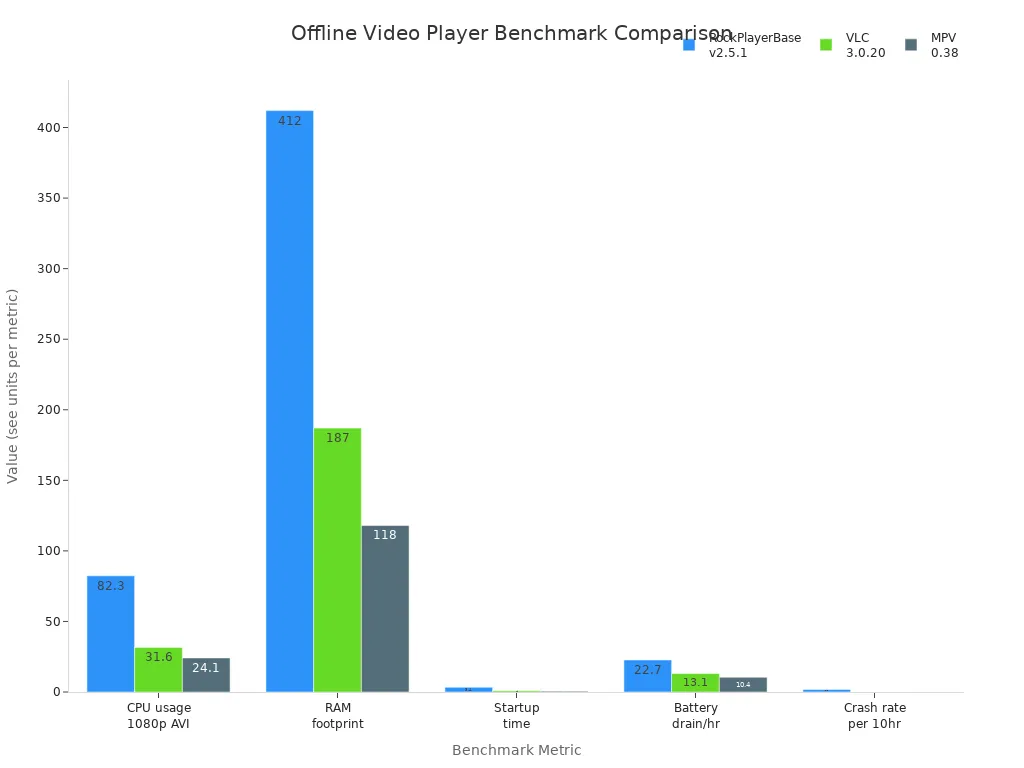
The following table shows how MPV Player compares to other offline video players in benchmark tests:
Metric | RockPlayerBase v2.5.1 | VLC 3.0.20 | MPV 0.38 |
|---|---|---|---|
82.3% | 31.6% | 24.1% | |
RAM footprint (idle + 1080p playback) | 412 MB | 187 MB | 118 MB |
Startup time to first frame (cold boot) | 3.4 s | 0.9 s | 0.6 s |
Battery drain per hour (1080p) | 22.7% loss | 13.1% loss | 10.4% loss |
Crash rate per 10 hours | 1.8 crashes | 0.0 crashes | 0.0 crashes |
Strengths:
Strengths | Description |
|---|---|
Lightweight | Extremely lightweight and ready to use after extraction. |
Efficient | Small file size and fast performance. |
Highly Customizable | Extensive customization options and open-source flexibility. |
Receives Frequent Updates | Constant support and improvements from developers. |
Weaknesses:
Weaknesses | Description |
|---|---|
Lack of User Interface | No traditional interface; users must drag files or input links. |
Hard to Download | No dedicated download button; manual download required. |
Frequent Updates May Become Annoying | Updates require manual action and can be frequent. |
Intimidating Technical Background | Technical setup may challenge inexperienced users. |
Best Use Cases
Feature | Description |
|---|---|
Save videos, playlists, or audio for offline use with full control over format and quality. | |
High Customizability | Tailor player behavior, appearance, and controls. |
CLI-based Video Downloading | Fetch videos or playlists by URL using commands. |
Streaming to External Players | Pipe video streams to MPV for instant playback. |
Advanced Downloading Options | Download subtitles, choose formats, extract audio, and bypass geo-restrictions. |
Tip: For users who want a simple way to batch download high-quality video and audio files, TotalMedia VideoConverter’s downloader offers a fast and user-friendly solution. Paste multiple URLs, queue downloads, and process files instantly.
5. IINA
Overview
IINA is a modern video player built specifically for macOS users. It stands out because its interface follows Apple’s design guidelines. This means IINA looks and feels like a native Mac app. Users can control playback with the Touch Bar and customize trackpad gestures. Picture-in-picture mode lets people watch videos while working on other tasks, which helps with multitasking. Many users find IINA more integrated with macOS than other players.
Key Features
Touch Bar support for quick controls
Customizable trackpad gestures
Picture-in-picture mode for multitasking
Dark mode and theme options
Advanced subtitle management
Hardware acceleration for smooth playback
Note: IINA’s interface and features make it easy for Mac users to enjoy offline videos with minimal setup.
Formats & Platforms
IINA works on Apple Silicon Macs with macOS 12.0 or later and on Intel Macs with macOS 10.15 or later. It can play almost every media file, including MP4, MKV, AVI, MOV, and more. Users do not need to install extra codecs.
Pros & Cons
Pros | Cons |
|---|---|
Great video playback experience without disturbances | Large file size compared to other media players |
Various editing functions available | Only suitable for Mac users |
Best Use Cases
Watching downloaded streaming content on Mac devices
Using picture-in-picture mode for studying or working
Customizing playback with gestures and Touch Bar
Managing subtitles for foreign language videos
Tip: For users who want to batch download high-quality video and audio files for offline viewing, TotalMedia VideoConverter’s downloader offers a fast and simple solution. Paste multiple URLs, queue downloads, and process files instantly.
6. Infuse
Overview
Infuse is a modern video player designed for Apple users. It is known for its beautiful interface and smooth playback. Many people choose Infuse because it makes watching downloaded streaming content easy and enjoyable. The app organizes videos with cover art and metadata, so users can quickly find their favorite movies or shows.
Key Features
Plays videos in 4K Ultra HD with HDR support
Streams content from cloud storage like Google Drive and Dropbox
Automatically fetches subtitles and metadata
Supports AirPlay and Google Cast for big-screen viewing
Offers parental controls for family-friendly use
Syncs playback progress across devices
Formats & Platforms
Infuse works on iPhone, iPad, Apple TV, and Mac. It supports many file types, such as MP4, MKV, AVI, MOV, WMV, and more. Users do not need to convert files before playing them. The app also handles Dolby and DTS audio tracks.
Platform | Supported Formats |
|---|---|
iOS/macOS | MP4, MKV, AVI, MOV, WMV |
Apple TV | MP4, MKV, AVI, MOV, WMV |
Pros & Cons
Pros:
- Clean and modern interface
- Excellent subtitle and metadata support
- Plays almost any video format
- Cloud streaming and device sync
Cons:
- Some features require a paid version
- Only available for Apple devices
Best Use Cases
Watching high-quality movies on Apple TV
Organizing a large library of downloaded streaming content
Streaming videos from cloud storage
Syncing playback across multiple Apple devices
Enjoying a seamless video player experience with subtitle support
Tip: For users who want to batch download high-quality video and audio files for offline viewing, TotalMedia VideoConverter’s downloader offers a fast and easy solution. Paste multiple URLs, queue downloads, and process files instantly.
7. Video Library Offline
Overview
Video Library Offline is a practical tool for people who want to organize and watch downloaded streaming content without internet access. This app helps users build a personal library of movies, TV shows, and educational videos. It focuses on easy management and quick access to files. Many users choose this video player because it keeps their collections neat and accessible.
Key Features
Simple library organization with folders and tags
Fast search function for finding videos quickly
Built-in subtitle support for multiple languages
Bookmarking to save favorite scenes
Password protection for private videos
No ads or pop-ups during playback
Tip: Bookmarking lets users return to important moments in any video.
Formats & Platforms
Video Library Offline supports popular formats such as MP4, AVI, MKV, and MOV. It works on Android and iOS devices. Users can transfer files from computers or download them directly to their phones or tablets.
Platform | Supported Formats |
|---|---|
Android | MP4, AVI, MKV, MOV |
iOS | MP4, AVI, MKV, MOV |
Pros & Cons
Pros:
Easy to organize large video collections
Fast search and filter options
No ads or interruptions
Cons:
No desktop version
Limited advanced editing features
Best Use Cases
Managing a personal library of downloaded streaming content.
Watching videos offline while traveling or commuting.
Keeping educational videos organized for study sessions.
Protecting private videos with password security.
For users who want to download high-quality video and audio files in batches, TotalMedia VideoConverter’s downloader offers a fast and reliable solution. Paste multiple URLs, queue downloads, and process files instantly.
8. One Player
Overview
One Player is a modern video player designed for users who want a simple and efficient way to watch downloaded streaming content. It is known for its lightweight design and fast performance. Many people choose One Player because it does not use much storage space or system resources. The app is easy to use and works well for both beginners and advanced users.
Key Features
Plays videos in HD and 4K quality
Supports background playback for multitasking
Built-in subtitle downloader and editor
Night mode for comfortable viewing in low light
Gesture controls for volume and brightness
Playlist creation for organizing videos
Note: One Player’s subtitle tools help users enjoy foreign language films without extra steps.
Formats & Platforms
One Player supports many popular formats, such as MP4, MKV, AVI, MOV, and FLV. It is available for Android devices and can be downloaded from the Google Play Store. The app works on most smartphones and tablets.
Platform | Supported Formats |
|---|---|
Android | MP4, MKV, AVI, MOV, FLV |
Pros & Cons
Pros:
Fast and smooth playback
Easy-to-use interface
Low storage and battery use
Cons:
No desktop or iOS version
Some advanced features require in-app purchases
Best Use Cases
Watching downloaded streaming content on Android phones or tablets.
Creating playlists for movies or TV shows.
Adjusting playback settings with simple gestures.
Viewing videos in high quality without lag.
9. KMPlayer
Overview
KMPlayer is a well-known video player that has served millions of users for over a decade. It is popular for its ability to handle high-definition videos and a wide range of file types. Many people choose KMPlayer because it offers a smooth viewing experience and a modern interface. The app continues to receive updates, which helps it stay compatible with new devices and formats.
Key Features
Supports 4K, 8K, and even 3D video playback
Offers advanced subtitle controls, including font and color adjustments
Allows users to capture screenshots and record sections of videos
Provides playback speed control and video rotation
Includes cloud storage integration for easy access to files
Tip: KMPlayer’s subtitle tools help users enjoy foreign films with ease.
Formats & Platforms
KMPlayer works on Windows, macOS, Android, and iOS. It supports many file formats, such as MP4, AVI, MKV, MOV, FLV, and more. Users can play both local files and content from cloud storage.
Platform | Supported Formats |
|---|---|
Windows | MP4, AVI, MKV, MOV, FLV, WMV |
macOS | MP4, AVI, MKV, MOV, FLV, WMV |
Android | MP4, AVI, MKV, MOV, FLV |
iOS | MP4, AVI, MKV, MOV, FLV |
Pros & Cons
Pros:
Handles high-resolution videos smoothly
Customizable interface and playback options
Free to use
Cons:
Contains ads in the free version
Some advanced features may require extra setup
Best Use Cases
Watching downloaded streaming content in 4K or 8K quality.
Adjusting subtitles for better understanding.
Playing videos from cloud storage on any device.
Recording video clips for sharing or study.
Comparison Table

Key Features Compared
Choosing the right offline video player depends on your needs. The table below compares the key features of the top nine players. This helps users see which app fits their device and viewing habits.
Player | Platforms | Format Support | Subtitle Support | Customization | Batch Download | Cloud/Network Access | Free Version |
|---|---|---|---|---|---|---|---|
VLC Media Player | Win/Mac/Linux/iOS/Android | Very High | Yes | High | No | Yes | Yes |
lPlayer | Android/iOS | High | Yes | Medium | No | No | Yes |
MX Player | Win/Mac/Android | High | Yes | High | No | Yes | Yes |
MPV Player | Win/Mac/Linux | Very High | Yes | Very High | No | Yes | Yes |
IINA | macOS | High | Yes | High | No | No | Yes |
Infuse | iOS/macOS/Apple TV | High | Yes | Medium | No | Yes | Limited |
Video Library Offline | Android/iOS | Medium | Yes | Low | No | No | Yes |
One Player | Android | High | Yes | Medium | No | No | Yes |
KMPlayer | Win/Mac/iOS/Android | High | Yes | High | No | Yes | Yes |
Tip: Most players support subtitles and a wide range of formats. Some offer advanced customization or cloud access. Only a few work on both desktop and mobile.
Choosing the Right Video Player
Device Compatibility
A good video player should work on all your devices. Cross-device compatibility means you can watch videos on your phone, tablet, or computer without problems. Many users want to start a movie on one device and finish it on another. Look for players that support both desktop and mobile platforms. This makes it easier to access your downloaded streaming content anywhere.
Feature | Description |
|---|---|
Compatibility | |
No Unnecessary Installations | Avoids clutter and keeps things simple |
Subtitle & Audio Support
Subtitle and audio support are important for a better viewing experience. Choose a player that lets you add subtitles in different languages. Some players allow you to adjust subtitle size, color, and timing. Multi-audio track support is helpful for watching foreign films or shows. This feature also helps people who are learning new languages.
Subtitle customization (size, color, timing)
Multi-audio track support
Advanced subtitle management
Playback Controls
Playback controls give you more power over your videos. Advanced controls let you change playback speed, skip scenes, or loop favorite parts. Gesture controls on mobile devices make it easy to adjust volume or brightness. These features help you enjoy your videos the way you like.
Play, pause, and skip scenes easily
Adjust playback speed for slow or fast viewing
Use gesture controls for quick changes
Price & Updates
Price matters when choosing a video player. Many top players are free, but some offer extra features with a paid version. Regular updates keep the app secure and add new functions. Choose a player that fits your budget and receives updates often.
Choosing the right offline video player helps users enjoy downloaded streaming content anywhere. Each app offers unique features for different needs.
FAQ
VLC Media Player works well for most people. It supports many formats, runs on all devices, and is free.
Yes. KMPlayer and Infuse support 4K and 8K playback. These apps handle high-resolution files smoothly.
Use TotalMedia VideoConverter’s Downloader. Paste URLs, queue downloads, and save high-quality video or audio in seconds. No browser extension needed.