Any Video Converter
Many users choose a handbrake alternative smart tv conversion for a simpler interface and device presets. Each tool offers straightforward controls and Smart TV compatibility. A comparison table and FAQ provide quick answers.
1. TotalMedia VideoConverter
Features
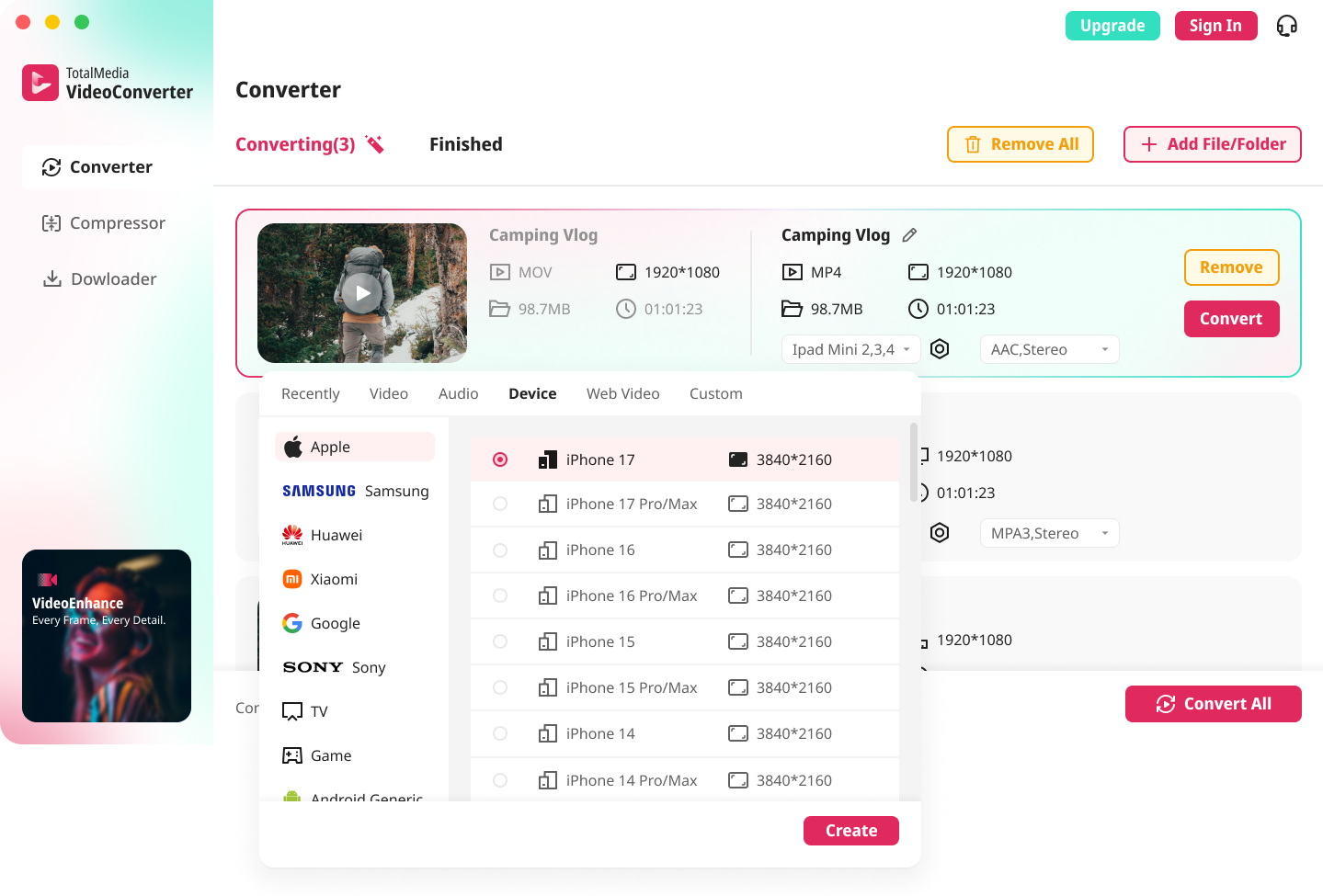
TotalMedia VideoConverter stands out as one of the best handbrake alternatives for users seeking a streamlined workflow. The software offers multi-format video and audio conversion, supporting mp4, mpeg, avi, mkv, and more. Its AI-powered compression engine reduces file sizes while maintaining high quality. Batch processing allows users to convert or compress entire folders of videos at once, saving time and effort. Device-optimized presets cover the latest Smart TVs, smartphones, and game consoles. Advanced users can fine-tune settings such as encoder, resolution, and bitrate, or save custom profiles for future use. The real-time monitoring dashboard displays progress and estimated time remaining for each conversion.
Pros & Cons
Pros:
Intuitive interface suitable for beginners and professionals
Broad format support, including mp4 and mpeg
AI-powered smart compression for efficient storage
Batch processing for large media libraries
Device presets for Smart TVs and other platforms
Cons:
Desktop application only
Paid software
Smart TV Compatibility
TotalMedia VideoConverter is a top handbrake alternative smart tv conversion tool due to its device-optimized presets and real-time monitoring features. Users can ensure compatibility with the latest Smart TV video formats by following a simple process. Open the converter, add your files, and select mp4 as the output format under the Video tab. Adjust custom settings to use the H.264 encoder, maintain 1920×1080 resolution, and set the bitrate between 15–25 Mbps. For audio, choose the AAC codec at a 48kHz sample rate. The software’s presets make it easy to prepare content for any Smart TV model. Compared to freemake video converter or any video converter, TotalMedia offers more advanced automation and monitoring, making it one of the best handbrake alternative options for 2026.
2. Movavi Video Converter
Features
Movavi Video Converter is a popular choice for users who want a fast and reliable handbrake alternative. The software stands out for its user-friendly interface and quick conversion process. It supports over 180 format presets, including mp4 and mpeg, making it easy to prepare videos for Smart TVs. Movavi also offers device-specific presets, so users can select their TV brand and model for optimal results. The converter includes extra tools like compression, trimming, and merging, which help users customize their files before conversion.
Tip: Movavi’s multilingual support makes it accessible for users worldwide.
Feature | Description |
|---|---|
Intuitive Interface | Fluid and friendly design simplifies the conversion process. |
Multilingual Support | Interface available in multiple languages for global accessibility. |
Additional Functionalities | Includes compression, trimming, and merging for enhanced usability. |
Pros & Cons
Pros:
Simple interface suitable for beginners
Fast conversion speed, often under five minutes
Wide format support, including mp4 and mpeg
Device presets for Smart TVs
Cons:
Paid software
Limited advanced settings compared to some handbrake alternatives
Handbrake Alternative Benefits
Movavi Video Converter is one of the best handbrake alternatives for Smart TV users. Many users find HandBrake powerful but challenging due to its complex interface. Movavi simplifies the process with clear menus and device presets. The converter completes tasks quickly, even with large files. Compared to freemake video converter or any video converter, Movavi offers a more refined experience for beginners. The table below highlights key differences:
Feature | Movavi Video Converter | HandBrake |
|---|---|---|
User Interface | User-friendly for beginners | Complex, may challenge beginners |
Conversion Speed | Fast, under five minutes | Slower without GPU acceleration |
Format Support | Over 180 presets (mp4, mpeg) | Granular codec control |
Cost | Paid | Free and open-source |
Movavi is a top handbrake alternative smart tv conversion tool for those who want speed and simplicity.
3. Freemake Video Converter
Features
Freemake Video Converter offers a straightforward solution for users seeking a handbrake alternative. The software provides a free version that enables video conversion from over 250 formats. Users can easily convert files to mp4, avi, or mpeg, which are ideal for Smart TV playback. The interface is simple, allowing quick selection of input and output formats. Freemake supports both 720p and 1080p resolutions, making it suitable for most modern TV sets. The converter also includes basic editing tools, such as trimming and joining clips.
Freemake Video Converter is recognized as one of the best handbrake alternatives for those who prioritize ease of use and wide format compatibility.
Format | Description |
|---|---|
MP4 | Widely used format for video playback on Smart TVs. |
AVI | Another common format supported for TV playback. |
Pros & Cons
Pros:
Free version available for basic conversions
Supports a large number of formats, including mp4 and mpeg
Simple workflow suitable for beginners
Cons:
The free version adds a Freemake welcome screen at the start of videos
A prominent Freemake logo appears throughout the video
Upgrading to the Mega Pack is necessary to remove the watermark
Smart TV Use
Freemake Video Converter is a practical handbrake alternative smart tv conversion tool. Users can convert videos for Smart TV playback by selecting mp4 or avi as the output format. The converter’s presets simplify the process for various TV brands. While the free version is accessible, users should note the watermark and welcome screen. For those who need watermark-free videos, upgrading is required. Compared to any video converter, Freemake offers a more accessible entry point for new users.
4. Any Video Converter (AVC)
Features
Any Video Converter (AVC) is a popular handbrake alternative for users who want a simple way to convert videos for Smart TVs. The converter supports a wide range of input formats, including mp4 and mpeg, making it easy to prepare content for most devices. AVC offers device presets, so users can select the best settings for their Smart TV without manual adjustments. Batch conversion is a standout feature, allowing users to process multiple files at once. This is especially useful for large video libraries.
AVC processes videos at high speed, reaching up to 130X faster than standard converters.
Feature | Description |
|---|---|
Batch Conversion | Allows users to convert multiple videos simultaneously |
Speed | High-speed processing at 130X |
Pros & Cons
AVC provides a user-friendly interface and versatile tools. It supports nearly all major video and audio input formats, but output options focus on common formats like mp4, avi, and mkv. The converter always transcodes videos, which can cause some quality loss, though modern codecs like HEVC and AV1 help reduce this issue. Conversion speed is slower than some competitors, with a 10-minute SD video taking about 2 minutes.
Aspect | Evidence Summary |
|---|---|
Format Support | Supports most input formats; output limited to mp4, avi, mkv, etc. |
Conversion Speed | Slower than some alternatives; not ideal for urgent tasks. |
Output Quality | Some quality loss due to transcoding, but modern codecs help. |
Pros | Versatile tools, easy interface. |
Cons | Limited output options, slow speed. |
Handbrake Alternatives Comparison
Any Video Converter stands out as a handbrake alternative smart tv conversion tool for users who value batch processing and device presets. While it supports mp4 and mpeg formats, its conversion speed is slower than the best handbrake alternatives like TotalMedia VideoConverter or freemake video converter. However, its simple interface and broad format support make it a reliable handbrake alternative for everyday Smart TV video conversion tasks.
5. VLC Media Player
Features
VLC Media Player is a versatile tool that goes beyond simple playback. It includes a built-in converter accessible through the Media menu. Users can convert videos into formats compatible with Smart TVs. The software is free and open-source, making it a popular handbrake alternative for many users. VLC supports a wide range of video and audio formats, including mp4, mpeg, and avi. The converter allows users to select device-specific presets, such as ‘Video for MPEG4 1080p TV/device.’ This feature helps users convert large 4K videos into smaller files suitable for Smart TV playback. All conversions happen locally, which protects user privacy.
VLC Media Player offers a reliable solution for those who need a free converter with Smart TV compatibility.
Pros & Cons
Pros:
Free and open-source software
Supports many video and audio formats
Built-in converter with device presets
Works on Windows, macOS, and Linux
Cons:
Interface can be confusing for beginners
Limited editing features compared to freemake video converter
Smart TV Conversion
VLC Media Player simplifies the process of converting videos for Smart TVs. Users open the converter, add their files, and select the Smart TV preset. The software transcodes videos into mp4 or mpeg formats, which most TVs support. The conversion process is straightforward and does not require advanced technical knowledge. VLC stands out among handbrake alternatives because it combines playback and conversion in one package. Many users consider it one of the best handbrake alternatives for Smart TV video conversion.
6. Format Factory
Features
Format Factory provides users with a comprehensive converter that supports a wide range of video, audio, image, and even PDF formats. The software includes hundreds of preset profiles optimized for Smart TVs, making it easy to select the right settings for any device. Batch processing stands out as a core feature. Users can convert multiple files at once, which saves time and effort. The Pro version uses multi-core CPU and GPU acceleration for faster processing, but both free and Pro versions offer efficient batch conversion. Device presets cover popular TV brands, so users do not need to adjust technical details manually.
Pros & Cons
Feature | Description |
|---|---|
Supported OS | Windows |
Versatility | Handles video, audio, image, and PDF conversions, as well as Blu-ray, DVD, and CD conversions. |
Video Editing Features | Offers clipping, joining, splitting, cropping, and delogo capabilities. |
Conversion Speed | Fast conversion speeds enhance user experience. |
User Interface | User-friendly interface suitable for all skill levels. |
Limitations | Cannot decrypt copy-protected files. |
Handbrake Alternative for Smart TV
Format Factory is a practical handbrake alternative for Smart TV video conversion. The software’s device presets and batch processing features make it easy to prepare large video libraries for playback on any Smart TV. Users can convert files to mp4 or mpeg formats with one click. The interface is simple, so even beginners can complete conversions without confusion. Compared to freemake video converter, Format Factory offers more versatility and editing tools. Many users consider it one of the best handbrake alternatives for those who want a reliable and efficient converter for Smart TV use.
7. iDealshare VideoGo
Features
iDealshare VideoGo offers a straightforward solution for users who want a reliable handbrake alternative. The software features a clean interface that guides users through each step of the video conversion process. It supports a wide range of video and audio formats, making it easy to convert files for Smart TV playback. Users can select from device-specific presets, which eliminates the need for manual adjustments. The converter also allows for batch processing, so multiple files can be converted at once.
Tip: iDealshare VideoGo preserves the original video quality during conversion, which is important for large-screen Smart TVs.
Pros & Cons
Pros:
Simple and intuitive interface
Supports many video and audio formats
Presets for major Smart TV brands
Maintains high video quality
Batch conversion saves time
Cons:
Paid software with a limited free trial
Lacks advanced editing features
Smart TV Support
iDealshare VideoGo stands out as a handbrake alternative because of its strong device compatibility and format support. The converter includes presets for popular Smart TV brands such as Samsung, LG, Panasonic, and Apple TV. It can convert unsupported video formats and codecs to Smart TV-friendly options like MP4 H.264. Users can also adjust video resolution to match their TV’s requirements. The table below highlights unique features for Smart TV users:
Feature Description | Details |
|---|---|
Video Format Conversion | Converts unsupported formats to Smart TV-compatible MP4 H.264 |
Device Compatibility | Supports Samsung, Toshiba, Panasonic, Apple TV, LG, and more |
Resolution Conversion | Adjusts video resolution for Smart TV playback |
Quality Preservation | Ensures no quality loss during conversion |
Presets for Devices | Offers tailored presets for easy conversion |
iDealshare VideoGo makes Smart TV video conversion simple and efficient for all users.
Comparison Table for Handbrake Alternative Smart TV Conversion
Key Differences Overview
Choosing the right tool for video conversion can be challenging. Each software offers unique strengths for Smart TV users. The table below highlights the main features, ease of use, Smart TV compatibility, and pricing for the top seven options. This overview helps readers quickly compare and select the best handbrake alternative smart tv conversion solution for their needs.
Converter Name | Main Features | Ease of Use | Smart TV Compatibility | Pricing Model |
|---|---|---|---|---|
AI compression, batch processing, device presets | ★★★★★ | Latest device presets, 4K/HD | Paid (lifetime license) | |
Movavi Video Converter | Fast conversion, device presets, editing tools | ★★★★☆ | Brand/model presets, 4K/HD | Paid (lifetime license) |
Freemake Video Converter | Free version, simple workflow, basic editing | ★★★★☆ | Presets for major TV brands | Free (watermark), Paid |
Any Video Converter | Batch conversion, device presets, broad formats | ★★★★ | Presets for Smart TVs | Free, Paid Ultimate |
VLC Media Player | Free, open-source, built-in converter | ★★★★ | Device presets, 1080p/4K | Free |
Format Factory | Multi-format, batch, editing, device presets | ★★★★☆ | Presets for TV brands, 4K/HD | Free, Paid Pro |
iDealshare VideoGo | Wide format support, batch, device presets | ★★★★☆ | Presets for major Smart TVs | Paid (trial available) |
Note: Ease of use ratings are based on user reviews and interface design.
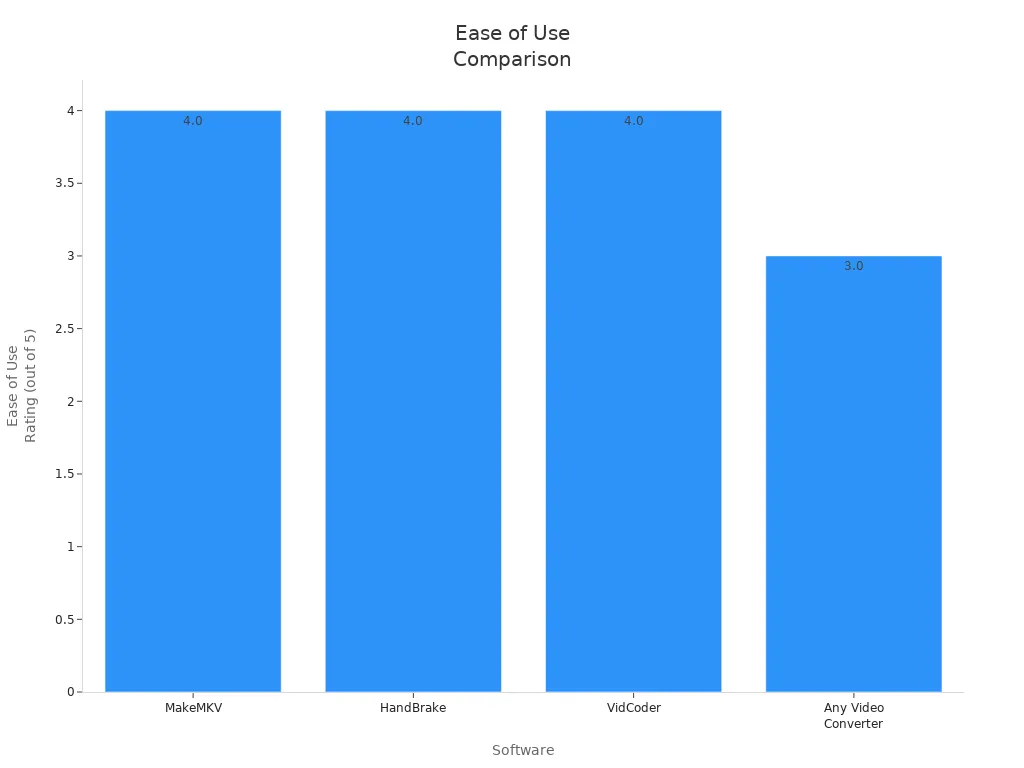
Most users prefer tools with device presets and batch processing for efficient video conversion. Smart TV compatibility depends on up-to-date presets and support for formats like MP4 and H.264. Pricing varies, with free options available, but paid versions often remove watermarks and unlock advanced features.
For beginners, FoneLab Video Converter Ultimate stands out for its intuitive design and ability to convert videos for Smart TVs. Advanced users may prefer TotalMedia VideoConverter for its AI-powered features. Free options like VLC Media Player help users convert videos efficiently. For reliable video converting, TotalMedia remains the top recommendation.
FAQ
Most Smart TVs support MP4 (H.264 video, AAC audio). Choose this format for maximum compatibility and smooth playback.
Yes, batch processing is available in TotalMedia VideoConverter, Format Factory, Any Video Converter, and iDealshare VideoGo.