
Many users experience frustration when attempting to send large video files. High resolution, extended duration, and inefficient file formats often cause these issues.
File size limitations affect nearly every platform, making it a widespread challenge.
Media professionals regularly encounter files too large to transfer, leading to slow speeds and interruptions.
Understanding why these obstacles occur can help you learn how to send large video files with ease.
Why Video Files Get Too Large

Understanding why video files become too large to send is the first step in overcoming file size limits. Several factors contribute to this common problem:
High Resolution and Quality
Higher resolution means more pixels in every frame, which increases the amount of data stored.
For example, a one-minute video at 1080p and 30 frames per second (fps) can reach 37.5 MB, while the same video at 4K and 60 fps can balloon to 300 MB.
The following table shows how resolution and frame rate impact file size:
Resolution | Frame Rate | Bit Rate | Length | Estimated File Size |
|---|---|---|---|---|
1080p | 30fps | 5Mbps | 1 min | 37.5 MB |
1080p | 60fps | 10Mbps | 1 min | 75 MB |
4K | 30fps | 20Mbps | 1 min | 150 MB |
4K | 60fps | 40Mbps | 1 min | 300 MB |
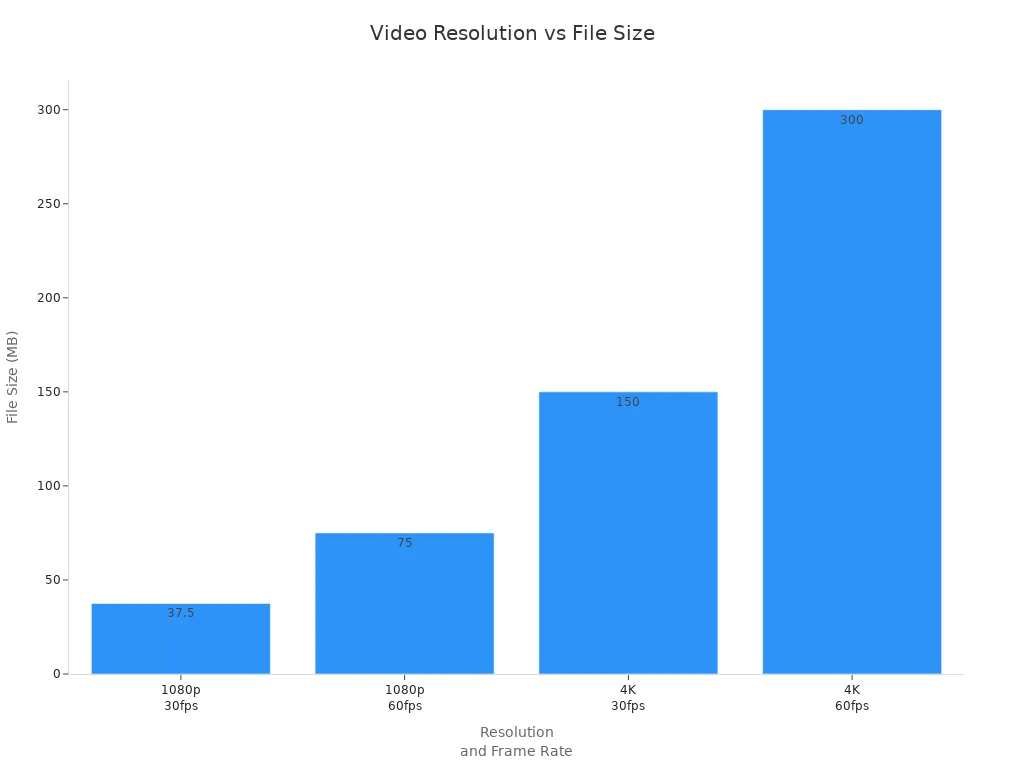
Note: Higher resolution generally increases file size because more pixels require more data to be processed.
Long Duration
Longer videos naturally require more storage space, regardless of resolution.
A five-minute video will be five times larger than a one-minute video at the same quality settings.
Both video length and resolution significantly affect overall file size, making it harder to send large video files when file size limits are strict.
File Format and Compression
Video files combine many images (frames) and audio, which adds up quickly.
Some formats, like older MPEG-1, use less efficient compression, resulting in larger files.
Modern codecs such as H.264 and H.265 compress video more efficiently, reducing file size without major quality loss.
Compression works by removing unnecessary data, making it easier to send large video files and stay within file size limits.
Understanding these factors helps you learn how to send large video files without running into file size limits.
How to Send Large Video Files

Sending large video files often presents challenges due to platform limits, network speeds, and device compatibility. Understanding why these obstacles occur helps users select the best ways to send large video files efficiently. Below are proven strategies and tools that address the core reasons behind oversized videos and offer practical solutions.
Compress with Video Tools
Compression tools play a critical role in reducing file size while maintaining visual quality. Many users struggle with sending large video files because uncompressed footage consumes excessive storage and bandwidth. Advanced applications like TotalMedia VideoConverter provide a streamlined approach to this problem.
TotalMedia VideoConverter uses an AI-powered compression engine to analyze and reduce file size without visible quality loss. This technology can achieve average reductions of 60–90%, depending on the original format and settings.
Batch processing allows users to compress multiple videos at once, saving significant time and ensuring consistent results across all files. This feature is essential for content creators who manage large media libraries.
The real-time file size preview in TotalMedia VideoConverter enables users to see the estimated output size before starting the process, eliminating guesswork and ensuring files meet platform requirements.
Tip: Lowering the resolution to 1080p, 900p, or 720p can further decrease file size. Exporting at 720p often provides a good balance between quality and storage needs.
Comparison of Compression Tools
Tool Name | Notes | |
|---|---|---|
Video Compressor Online | 60–90% | Maintains visual quality |
Free Video Size Reducer Online | 40–80% | Analyzes video for maximum compression |
WinX (MP4 HEVC format) | 89% | No further settings applied |
TotalMedia VideoConverter | 60–90% | AI-powered, batch processing, real-time preview |
Change to Efficient Formats
The choice of video format directly impacts file size and compatibility. Inefficient formats use outdated compression methods, resulting in unnecessarily large files. Switching to a modern, efficient format is one of the best ways to send large video files.
H.264 and H.265 (HEVC) are widely recognized for their high compression efficiency and broad compatibility. H.265 offers even greater reductions, making it ideal for 4K and high-resolution content.
TotalMedia VideoConverter supports conversion to and from dozens of formats, including H.264 and H.265, with device-optimized presets for seamless playback on any platform.
Video Format | Compression Efficiency | Typical Use Cases |
|---|---|---|
H.264 | Moderate | Streaming, Blu-ray |
H.265 (HEVC) | High | 4K video, Streaming |
H.266 (VVC) | Very High | Future 4K/8K video |
Switching to a more efficient format reduces file size through advanced compression techniques. This process also improves compatibility with modern devices and file transfer services, ensuring smooth playback and sharing.
Trim or Cut Unneeded Parts
Many videos contain unnecessary footage that increases file size without adding value. Trimming or cutting these sections is a practical way to send large video files more efficiently.
Remove intros, outros, or silent segments to focus on the essential content.
Lower the resolution, frame rate, or bitrate during export to further minimize file size. For example, reducing from 60fps to 30fps or from 4K to 1080p can significantly decrease storage requirements.
Best practices for trimming videos:
Adjust the resolution to match the target platform, such as 1080p or 720p.
Reduce the frame rate if high motion is not required.
Lower the bitrate to balance quality and file size.
Use Cloud Storage or Links
When file size remains an obstacle, cloud storage links provide a reliable solution for sending large video files. Cloud-based file transfer services offer ample storage, advanced sharing options, and robust security features.
Service | |
|---|---|
Google Drive | 5TB |
Dropbox | 50GB (desktop), 10GB (web) |
OneDrive | 100GB |
Box | 5GB |
We Transfer | 2GB (free users) |
SharePoint | 250GB |
Cloud storage services enable users to upload videos and share download links with collaborators or clients. These platforms support time-limited and password-protected links, end-to-end encryption, and two-factor authentication for enhanced security. Regularly reviewing shared files and permissions helps prevent unauthorized access.
Note: Cloud storage links are especially useful for sending large video files that exceed email or messaging limits.
Why Use Cloud Storage?
Ample storage space accommodates high-resolution media.
Advanced collaboration features improve teamwork and accessibility.
Security options protect sensitive content during transfer and storage.
By understanding why video files become too large and applying these targeted solutions, users can overcome the most common challenges in sending large video files. Selecting the right compression tools, efficient formats, and secure file transfer services ensures a smooth and reliable sharing experience.
To send large video files efficiently, compress videos, switch to modern formats, and trim unnecessary footage. These steps improve upload speeds, enhance security, and support sustainability. Users report fewer transfer issues and clearer communication. With the right tools, sharing videos becomes faster and easier for both personal and professional needs.
FAQ
Most email platforms limit attachment size to prevent server overload and ensure fast delivery. Large video files often exceed these limits, causing rejection or failed uploads.
Compressing removes unnecessary data, reducing file size. Smaller files transfer faster, use less storage, and meet upload requirements for most platforms.
Why should I choose modern video formats like H.264 or H.265?
Modern formats use advanced compression.They produce smaller files with high quality. Compatibility improves across devices and streaming platforms.