What VMake AI Does Well — and Where It Falls Short
VMake AI is a browser-based platform that has evolved well beyond a simple video enhancer. It combines AI video generation, viral video recreation, AI avatar creation, product video showcase, video enhancement, watermark removal, background removal, auto captions, and more in one workflow. For small businesses and social media creators, that breadth is genuinely useful.
The video enhancer specifically received a significant upgrade in early 2026. VMake introduced AI 4K+, a new enhancement mode featuring generative detail rebuild, artifact cleanup, and five specialized models including Portrait, Product, Low-Light, Gaming, and Anime.
But VMake has real limitations that send users looking elsewhere:
- It can over-smooth details, causing an artificial “painted” effect and slight color shifts, especially in close-ups.
- Pricing is credit-based. Pro Plans offer 20 credits at $4.99/month up to 200 credits at $34.99/month. For heavy users, credits run out fast.
- It is browser-only — no desktop app, no local processing, no offline workflow.
- No frame interpolation for smoothing choppy footage.
- File size and length limits apply on lower tiers.
If any of those limitations are your reason for looking elsewhere, the seven tools below cover the full range of what VMake does not.
How to Choose the Right Alternative
The right VMake alternative depends on two things: where you work and what you need the output for.
Browser-based tools (no installation) suit casual users, creators on shared machines, or anyone who needs a quick result without software setup. VMake itself is browser-based — most direct alternatives are too.
Desktop software delivers significantly better output quality and local processing speed, but requires installation and a capable GPU for best results. This is where the professional-grade tools live.
Use case splits the field further:
- Restoring old or degraded footage → Topaz Video AI or AVCLabs
- Social media content and quick upscaling → HitPaw VikPea or CapCut
- Browser-based with no signup → TotalMedia VideoEnhance or TensorPix
- Full UGC video creation workflow → CapCut or Runway
- Maximum quality, maximum control → Topaz Video AI
The 7 Best VMake Alternatives in 2026
1. Topaz Video AI — Best Output Quality, Professional Grade
Type: Desktop (Windows, Mac)
Price: $299/year (subscription, post-2025 pricing shift)
Best for: Filmmakers, archivists, professional post-production
Topaz Video AI is the quality benchmark in this space. It runs locally, ships with six specialized AI models including Proteus, Artemis, Gaia, and Iris, and lets you mix models per pass. No other tool on this list offers that level of granular control over enhancement parameters.
It offers over 25 specialized models for everything from interlaced TV footage to high-end cinematic upscaling, with industry-leading AI stabilization and motion deblur that few competitors can match.
The trade-offs are real. Processing a 60-second 1080p-to-4K upscale takes 15–40 minutes depending on your GPU. And Topaz killed perpetual licenses in September 2025 and moved entirely to a subscription model — a controversial decision that has pushed many users toward alternatives.
Better than VMake for: Professional restoration, archival footage, any use case where output quality is the only metric that matters.
Worse than VMake for: Quick turnaround, browser-based workflow, budget-conscious users.
2. HitPaw VikPea — Best for Beginners Who Want Real Results
Type: Desktop + online version (Windows, Mac, iOS, Android)
Price: Free trial (export locked); paid plans via monthly, yearly, or lifetime license
Best for: Content creators, vloggers, anyone restoring personal footage
HitPaw VikPea positions itself as the approachable alternative to Topaz — and it earns that positioning. It prioritizes a results-first workflow, packaging powerful AI models into a clean drag-and-drop interface that requires zero previous editing experience.
It supports AI upscaling up to 8K, frame rates up to 60fps, and allows users to manually set bitrate up to 180 Mbps. The Face Model is particularly well regarded for portrait and vlog content — it automatically optimizes portraits, a strong feature for vloggers.
The limitation worth knowing: it may occasionally over-process complex textures compared to Aiarty, but delivers a punchy, sharp look that works well for modern displays.
Better than VMake for: Dedicated video enhancement with more model options, local processing, no credit system.
Worse than VMake for: UGC creation workflow, watermark removal, background removal — HitPaw is an enhancer, not a full content creation platform.
3. TotalMedia VideoEnhance — Browser-Based Alternative With No Signup Required
Type: Browser-based web application
Price: Free tier + Pro upgrade (unlocks 8K, higher file size limits); starts from $19.99
Best for: Users who want browser-based enhancement without credit limits for standard use
TotalMedia VideoEnhance is a direct browser-based alternative to VMake’s video enhancer — without the UGC platform overhead VMake carries. Where VMake has evolved into a broad content creation suite, VideoEnhance focuses entirely on video quality improvement.
The AI Smart Enhance engine addresses noise, blur, low contrast, color fade, and compression artifacts in a single pass. Resolution upscaling runs from 100% (original) through 200% (1080p) and 400% (4K), with 8K available on the Pro plan. Frame Interpolation synthesizes new frames to smooth choppy or low-frame-rate footage — a capability VMake’s enhancer does not offer.
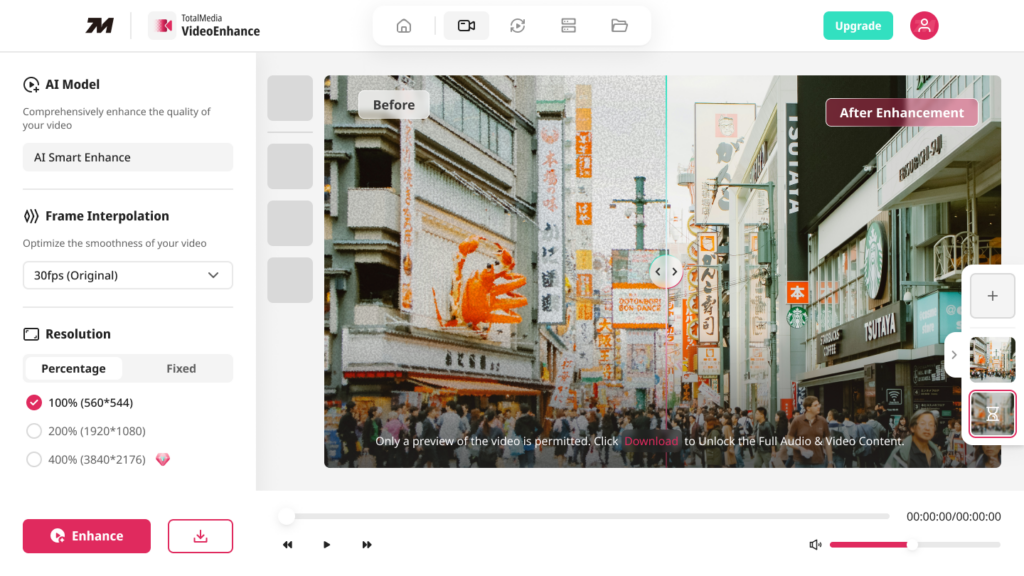
The split-screen before/after preview renders at actual output resolution before the full enhancement runs — so you see exactly what you are committing to before processing begins. A multi-file queue handles multiple clips in one session without returning to the home screen.
For users specifically frustrated by VMake’s credit system or its tendency to over-smooth portrait detail, TotalMedia VideoEnhance’s AI Smart Enhance model takes a different approach — comprehensive improvement without the painted-skin artifact that VMake reviewers flag in close-up footage.
Better than VMake for: Frame interpolation, focused enhancement workflow, no-signup access, split-screen quality preview before processing.
Worse than VMake for: VMake’s broader UGC creation suite — avatar videos, viral recreation, product showcase — are outside VideoEnhance’s scope.
4. Aiarty Video Enhancer — Best Value Desktop Option
Type: Desktop (Windows, Mac)
Price: ~$165 lifetime license
Best for: Users who want near-Topaz quality without Topaz’s subscription cost
For most users seeking a Topaz Video AI alternative, Aiarty hits the sweet spot — $284–$350 lifetime license, 8K maximum resolution, available on Windows and Mac. It excels particularly at upscaling AI-generated video from tools like Midjourney or Runway, producing clean results that hold up against Topaz’s standard models.
What makes Aiarty worth including here is the lifetime license model at a time when most competitors have moved to subscriptions. Its lifetime license costs around $165, supports three PCs, and includes free lifetime updates — for those who prefer a subscription, there is also an annual plan at $79.
Better than VMake for: Local processing, no credit system, 8K output, long-term cost.
Worse than VMake for: Browser-based access, UGC workflow tools.
5. CapCut — Best Free Option for Social Media Creators
Type: Web, Windows, Mac, iOS, Android
Price: Free; CapCut Pro at $9.99/month or $74.99–$89.99/year
Best for: Social media creators who want enhancement and editing in one place
CapCut is the ultimate choice for social media creators and hobbyists who value speed and convenience above all else. It provides a good-enough AI upscale that is perfectly tuned for smartphone screens and social platforms.
Where CapCut separates itself from every other tool on this list is integration. Enhancement happens inside the editor — no export, re-import, and re-edit cycle. For creators publishing daily to TikTok, Instagram, or YouTube Shorts, that workflow efficiency is worth more than the marginal quality difference between CapCut and HitPaw.
The free version allows full-quality previews but strictly locks all exports behind a paywall — a meaningful limitation for users who want to evaluate output before paying.
Better than VMake for: Integrated editing and enhancement workflow, free tier breadth, cross-platform availability.
Worse than VMake for: Dedicated video enhancement quality, watermark removal, product-specific AI tools.
6. AVCLabs Video Enhancer AI — Best for Face Recovery and Old Footage
Type: Desktop (Windows, Mac)
Price: ~$169 lifetime
Best for: Family video restoration, portrait-heavy content, black-and-white colorization
AVCLabs specializes in face enhancement and recovery. If you’re restoring family videos where clear faces matter most, this tool produces remarkable results — often surpassing Topaz Video AI for this specific use case.
Beyond face recovery, AVCLabs supports AI upscaling to 8K, AI face enhancement, black-and-white video colorization, and motion compensation allowing smooth slow-motion playback up to 16x.
For VMake users specifically frustrated by over-smoothed skin in portrait videos — a documented VMake limitation — AVCLabs is the most targeted alternative.
Better than VMake for: Face detail restoration, colorization of black-and-white footage, family video restoration projects.
Worse than VMake for: Browser access, broader content creation workflow.
7. TensorPix — Best Free Browser Tool for Quick Enhancement
Type: Browser-based
Price: Free tier (credit-based); paid subscription for higher volume
Best for: Occasional users who want browser-based enhancement without VMake’s pricing structure
TensorPix is a browser-based AI video upscaler with a free tier — making it the closest structural match to VMake’s free access model without the full UGC platform attached. It handles upscaling and noise reduction cleanly for standard enhancement tasks.
The free tier is genuinely useful for occasional use. Processing happens on TensorPix’s servers — no local GPU required — which makes it accessible on any device regardless of hardware. Output quality sits below HitPaw or Aiarty for demanding restoration work but is sufficient for social media repurposing and basic sharpening.
Better than VMake for: Simpler pricing structure, focused enhancement without UGC platform overhead.
Worse than VMake for: Feature breadth, specialized enhancement models, output quality ceiling.
Side-by-Side Comparison
| Tool | Type | Max Resolution | Frame Interpolation | Free Tier | Pricing Model | Best For |
|---|---|---|---|---|---|---|
| Topaz Video AI | Desktop | 8K | Yes (up to 120fps) | No | $299/year | Professional restoration |
| HitPaw VikPea | Desktop + Online | 8K | Yes (up to 60fps) | Trial only | Monthly / Lifetime | Beginners, content creators |
| TotalMedia VideoEnhance | Browser | 8K (Pro) | Yes | Yes | Free / Pro upgrade | Browser workflow, no signup |
| Aiarty | Desktop | 8K | Yes | Trial | ~$165 lifetime | Best value desktop |
| CapCut | Web + Desktop + Mobile | 4K | Limited | Yes | Free / $9.99/month | Social media creators |
| AVCLabs | Desktop | 8K | Yes (up to 16x slow-mo) | Trial | ~$169 lifetime | Face recovery, colorization |
| TensorPix | Browser | 4K | Limited | Yes (credits) | Credit-based | Occasional browser use |
| VMake AI | Browser | 4K+ (AI 4K+) | No | Yes (5 credits) | $4.99–$34.99/month | UGC creation + enhancement |
Which VMake Alternative Should You Choose?
You need the absolute best output quality and have a capable GPU: Topaz Video AI. Nothing else matches it for professional restoration work. The subscription cost is high but justified for serious use.
You want desktop quality without Topaz’s price or subscription: Aiarty at ~$165 lifetime is the best value on this list. Near-Topaz quality, perpetual license, Mac and Windows.
You need browser-based enhancement without VMake’s credit system and without signing up: TotalMedia VideoEnhance. Free tier access, split-screen preview before processing, frame interpolation VMake’s enhancer lacks.
You are a content creator publishing to social platforms daily: CapCut. Enhancement inside the editor, no extra workflow step, free tier is genuinely usable.
Your footage has people in it and faces look over-smoothed after enhancement: AVCLabs. Purpose-built face recovery that outperforms VMake and Topaz for portrait-specific restoration.
You want something simple and free on desktop: HitPaw VikPea’s free trial covers preview and testing — it gives you a real sense of the output before committing to a paid plan.
FAQ
TotalMedia VideoEnhance and TensorPix both offer free browser-based enhancement without requiring VMake’s credit system. TotalMedia VideoEnhance adds frame interpolation and a split-screen preview at full output resolution before processing — features VMake’s free tier does not include. CapCut is the best free option if you want enhancement integrated into a full editing workflow.
Topaz Video AI is the professional standard for video restoration. It offers over 25 specialized AI models, local processing, frame interpolation up to 120fps, and granular control over enhancement parameters that no browser-based tool matches. The trade-off is a $299/year subscription and processing times of 15–40 minutes per minute of footage on a capable GPU.
TotalMedia VideoEnhance and TensorPix are both fully browser-based — no installation required. TotalMedia VideoEnhance requires no signup for the free tier. TensorPix uses a credit system on the free tier. Both process video on their servers, so local hardware is not a factor.